Help & Tutorial

1. ACuaEODB Text Search Facility
This is a generelized search facility. This search facility is case insensitive. Here one can search with followings.
1. ACuaEODB ID (e.g., ACuaEO1)
2. EO name (e.g., C. chinensis essential oil)
3. Source (e.g., Coptis chinensis)
4. Type of EO (e.g., Natural)
5. EO Existence (e.g., Experimentally validated)
6. Target Organism (e.g., P. acnes ATCC 11827)
7. PubMed ID (e.g., 38067455)
ACuaEODB Advanced Search Facility
This is a generelized search facility. This search facility is case insensitive. Click on 'Add Field' to add a search field. An image of a build search query attached below.
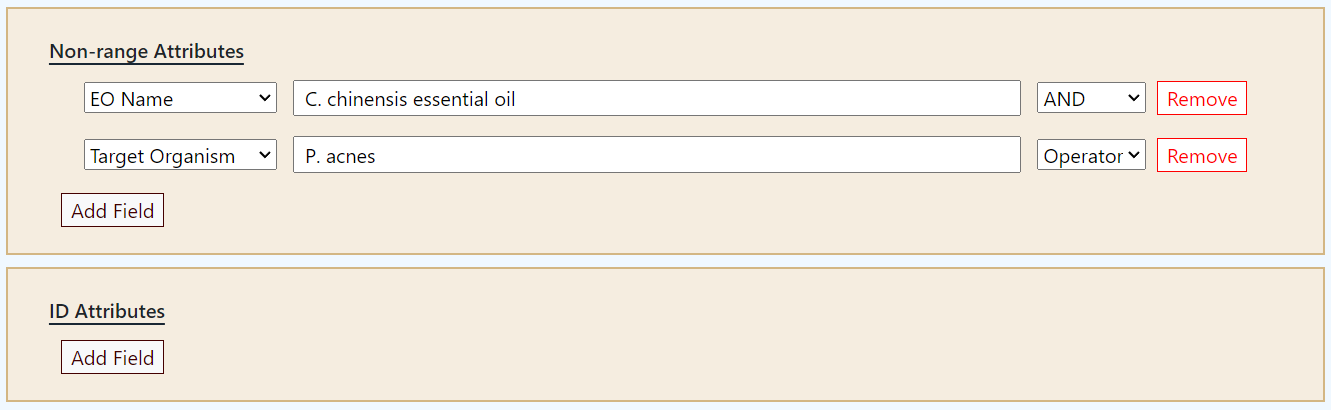
image
3. Understand Text Format of ACuaEODB database
The text format of ACuaEODB starts with two-character code followed by 4 blank space characters followed by the data. Each line is kept 90 characters long for better readability of the data. The description of the two-character code is given below.
ID => AMRSAEODB v1 Accession
EN => EO name/exact chemical compound of the oil/both
SR => Source
TP => EO type (Natural or artificial)
VL => EO Validation
TO => Target MRSA Strain
XR => Database Cross-reference
XX => Blank Line
// => End of an entry


© 2024, B&BL, DoAS, IIIT-A, India